SMS opt-in
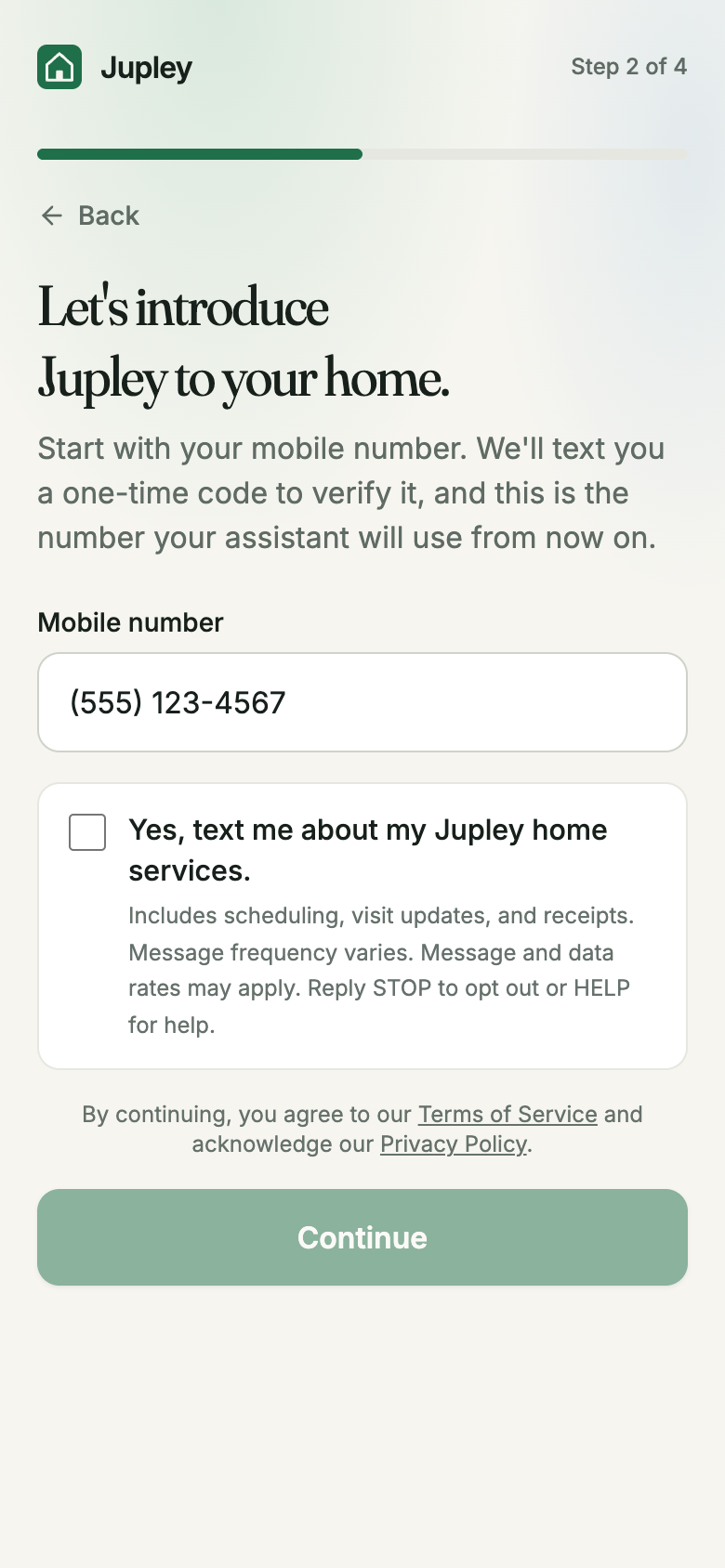
Jupley is a home-services assistant that runs over text. Jupley collects SMS consent with a checkbox on a web form on our website, not through a chat widget, pop-up, or by text message. The checkbox is on the number step of signup at jupley.com/signup, reproduced below exactly so it can be reviewed without creating an account. The "Continue" button is disabled until the box is checked, so no text is sent until the customer consents. If a customer's texts are ever off, the same checkbox and words appear on their account page to turn them on.
Checking the box and tapping "Continue" does two things: it records consent to the ongoing service texts described below, and it sends a single one-time verification code ("Your Jupley code is 123456. It expires in 10 minutes.") to confirm the number.
Web form · number step of signup at jupley.com/signup · consent for ongoing texts
Let's introduce Jupley to your home.
Start with your mobile number. We'll text you a one-time code to verify it, and this is the number your assistant will use from now on.
Screenshot of the live step: jupley.com/sms/opt-in-consent-step.png.
What happens
- The Terms of Service and Privacy Policy are linked in a line of their own directly above the button, apart from the texts checkbox: continuing agrees to the first and acknowledges the second.
- Checked, with the code request: consent is recorded with a timestamp on the account, the verification code is sent, and after the number is verified and services are set up Jupley sends a welcome text.
- Data used for messaging: the customer's name, mobile number, home address, and the messages exchanged. It is used only for transactional messaging about their services and is never shared or sold for marketing.
- Any time afterwards: reply STOP to opt out (one confirmation, then no further texts), START to opt back in, HELP for help or email support@jupley.com.
Screenshot of the live step: jupley.com/sms/opt-in-consent-step.png. Program details: jupley.com/sms.